Scaffold # 1 – Set Up Catapult


Warning: Undefined variable $num in /home/shroutdo/public_html/courses/wp-content/plugins/single-categories/single_categories.php on line 126

Warning: Undefined variable $posts_num in /home/shroutdo/public_html/courses/wp-content/plugins/single-categories/single_categories.php on line 127

Sign up for a web domain at https://catapult.bates.edu/

Scaffold # 2 – Oral Histories Data Structures


Warning: Undefined variable $num in /home/shroutdo/public_html/courses/wp-content/plugins/single-categories/single_categories.php on line 126

Warning: Undefined variable $posts_num in /home/shroutdo/public_html/courses/wp-content/plugins/single-categories/single_categories.php on line 127

Instructions:

Working with a partner (assigned in class), complete this scaffolding assignment in whatever format you choose, and upload it into Lyceum (section A) (section B). If you sketch out a data structure, take a picture and submit that. 


DO NOT put your names on your assignments – Lyceum will record your names automatically.


Part I – Assessing the Oral History Data

Look at the oral histories from Museum LA linked on Lyceum. Do not read them all, but make sure to look at a representative sample and over a sufficient number that you have a good sense of what kind of information is contained in each.


Make a list of:

  • What pieces of information did each interview record?
  • How do these pieces of information relate to one another?
  • What other pieces of information might you want to collect?
  • What scholarly questions might you be able to answer with data like that which you collected?

Include this list in your submission.


Part II – Structuring the Oral History Data

By now, you should have started to think about data as more than measurements or scientific experiments.  The last part of this week’s scaffolding assignment will be to come up with a data model for one of the archival collections.


Begin by answering the following questions:

  1. Define the “item” – before you come up with a data model, you want to think about scale. Do you want to create a data model that captures information about the individual interviewed?  The interviewer?  A particular employer?  A particular product?  There is not a right answer here, but you have to pick some kind of scale.
  2. What kind of information comes from the archival objects, and how would you want to capture it?
  3. What kind of information would you want to do additional research to locate?
  4. How do these pieces of information relate to one another?


Finally, draw a data model for your collection.  This is a first stab, so if you want inspiration check out this (very complicated) example:

https://wiki.openmrs.org/display/docs/Concept+Data+Model


Practice Exercise # 1 – Personal Data Census


Warning: Undefined variable $num in /home/shroutdo/public_html/courses/wp-content/plugins/single-categories/single_categories.php on line 126

Warning: Undefined variable $posts_num in /home/shroutdo/public_html/courses/wp-content/plugins/single-categories/single_categories.php on line 127

Instructions:

Complete this homework in a separate word document.  Submit it on Lyceum (section A) (section B) by the start of class on Thursday, September 13th.


Part I – Personal Data Census

Pick one (typical) three hour period over the next two days to complete a personal data census.  During this period, keep track of every time new data (of any kind) is collected about you.  Your personal census should include the kind of data you suspect was collected, but also any other relevant information.  Keep track of the data in whatever form you want – you’ll be structuring it in the next part of the assignment.


Part II – Structuring your data

Now that you have a sense of the data that you produce in one day, we are going to transform it into a very simple spreadsheet.


1.     Go to www.collabedit.com and click on “Create New Document.”

2.     When prompted, enter your name (or a made-up name)

3.     We are going to make a .csv file (comma separated values) by hand. Each line of text represents a series of columns. Each column is separated by a comma. First create your first row, by entering Date, Time, Data Collected, Comments. For each subsequent row, enter a data item you collected (i.e. 9/10/18, 5:00 PM, Bates Login, This happens every time I log into my computer).

4.     Enter one row for each new kind of data that you know (or suspect) was collected about you.

5.     Once you have entered in all of the data, click the download link.

6.     Change the name of the file you downloaded to yourlastname.csv (your computer might ask you if you are sure you want to change the file type.  You are sure. It should be .csv and not .txt)

7.     Open the file, to see if it looks like a spreadsheet

8.     Upload the file.

Warning: Undefined variable $num in /home/shroutdo/public_html/courses/wp-content/plugins/single-categories/single_categories.php on line 126

Warning: Undefined variable $posts_num in /home/shroutdo/public_html/courses/wp-content/plugins/single-categories/single_categories.php on line 127

Class 5.1

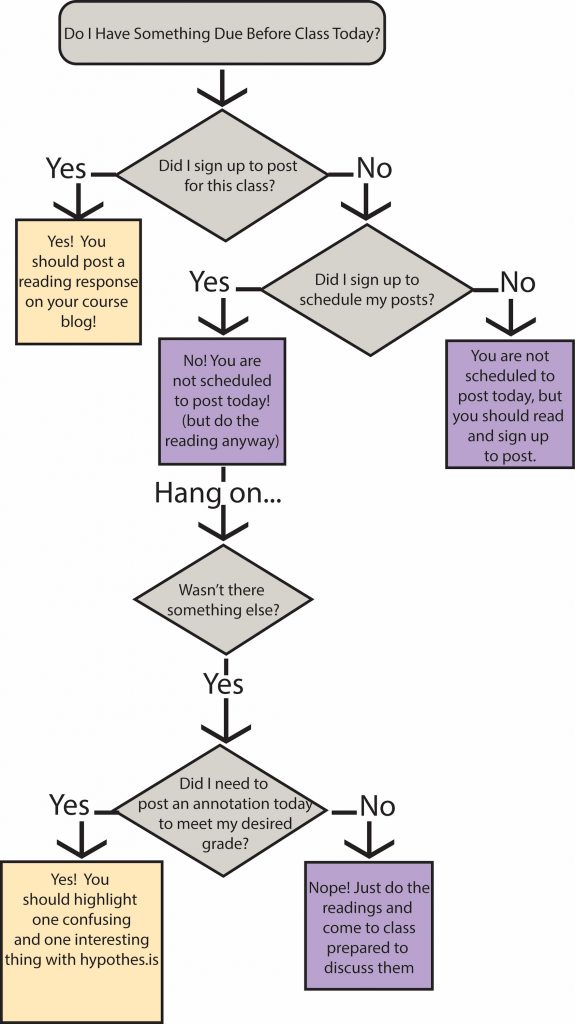
What do I need to do before class today?


Warning: Undefined variable $num in /home/shroutdo/public_html/courses/wp-content/plugins/single-categories/single_categories.php on line 126

Warning: Undefined variable $posts_num in /home/shroutdo/public_html/courses/wp-content/plugins/single-categories/single_categories.php on line 127

Figuring out what work needs to be done before each class can be a bit confusing – this flowchart should help you determine whether you should post a reading response or annotate some readings.

If you have forgotten whether or not you signed up to post, you can check here for section A (11:00-12:40) and here for section B (2:40-4:00). The google table lists your initials, as well as the classes for which you signed up to post. The next available class for which to post will be bolded. After a class has passed, it will be deleted from the list.

DCS 104 Class Work Flow Chart


More R practice


Warning: Undefined variable $num in /home/shroutdo/public_html/courses/wp-content/plugins/single-categories/single_categories.php on line 126

Warning: Undefined variable $posts_num in /home/shroutdo/public_html/courses/wp-content/plugins/single-categories/single_categories.php on line 127

For those of you who are interested in practicing more with R, you can download and test out this notebook (right-click or control-click and select save-link-as to download).


A static version is below for your perusal.


[iframe src=http://shroutdocs.org/notebooks/DCS104_f2018/R-intro-practice.html]

Warning: Undefined variable $num in /home/shroutdo/public_html/courses/wp-content/plugins/single-categories/single_categories.php on line 126

Warning: Undefined variable $posts_num in /home/shroutdo/public_html/courses/wp-content/plugins/single-categories/single_categories.php on line 127

Class 4.2


Warning: Undefined variable $num in /home/shroutdo/public_html/courses/wp-content/plugins/single-categories/single_categories.php on line 126

Warning: Undefined variable $posts_num in /home/shroutdo/public_html/courses/wp-content/plugins/single-categories/single_categories.php on line 127

Class 4.1


Warning: Undefined variable $num in /home/shroutdo/public_html/courses/wp-content/plugins/single-categories/single_categories.php on line 126

Warning: Undefined variable $posts_num in /home/shroutdo/public_html/courses/wp-content/plugins/single-categories/single_categories.php on line 127

Class 3.2


Warning: Undefined variable $num in /home/shroutdo/public_html/courses/wp-content/plugins/single-categories/single_categories.php on line 126

Warning: Undefined variable $posts_num in /home/shroutdo/public_html/courses/wp-content/plugins/single-categories/single_categories.php on line 127

Class 3.1